Apple Sidecar

Turn your old iPad
into a second display for Mac.
Keep documents, code, and chat in view, with less window switching.
Mac download coming soon
Check my iPad
macOS 13 or later · Apple silicon Mac · USB has no time limit · Pro is a one-time purchase, no subscription; price announced at launch
Which group is your iPad in?
Find your iPad model to check compatibility and installation options.
iOS 12
iPad Air (1st gen), iPad mini 2, iPad mini 3
Model A1474 · A1475 · A1476 · A1489 · A1490 · A1491 · A1599 · A1600 · A1601
With a Mac test build, use Safari browser mode without installing an iPad app. See the installation guide.
Native installation in preparation
iPadOS 15
iPad Air 2, iPad mini 4
Model A1566 · A1567 · A1538 · A1550
Sidecar is not supported. Use Safari browser mode until the SideLo App Store version is available.
Coming soon to the App Store
iPadOS 16 and later
iPad Pro 12.9 (1st gen), iPad Pro 9.7, iPad (5th gen) and newer
Model A1584 · A1652 · A1673 · A1674 · A1675 · A1822 · A1823 …
SideLo needs no shared Apple Account. Choose your model to compare Sidecar support.
Coming soon to the App Store
iOS 9–10
iPad 2, iPad (3rd gen), iPad (4th gen), iPad mini (1st gen)
Model A1395–A1397 · A1416 · A1430 · A1403 · A1458–A1460 · A1432 · A1454 · A1455
32-bit models cannot run the SideLo native app. Safari browser mode has not been verified on these models.
Native app unsupported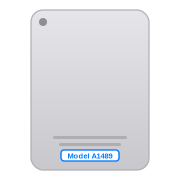
Not sure which one you have? Turn it over.
Find the “Model Axxxx” number near the bottom of your iPad’s back and match it to the list above.
Will it work with my iPad?
Sidecar says no to older iPads. SideLo starts at the iPad mini 2.
SideLo
Mac requirements: macOS 13 or later on Apple silicon. Sidecar requirements and each model's latest OS per Apple's documentation (November 2026).
Three steps to a second screen
No adapters, no account, no reboot.
Open SideLo on your Mac
Install and open SideLo, then allow Screen Recording. Mac download coming soon.
Connect your iPad
Browser mode: scan the QR code on the same Wi-Fi. Native app: choose USB or Wi-Fi.
Move a window over
Drag windows onto the second display. Use your Mac keyboard and mouse.
Why SideLo
A real extended display
The Mac creates an independent virtual display; video is encoded and decoded in hardware with H.264. Drag windows over like any other monitor.
direct wireless, USB and LAN
Choose USB or Wi-Fi in the native app. Reconnect from the device list when changing connection methods. No dongle or dummy HDMI plug needed.
Old iPads, taken seriously
The whole point is to keep iPads from 2013 onward useful instead of locking them out.
Pay once
No subscription. Pro is a one-time purchase: keep the version you buy forever, with 2 years of free updates; upgrading after that is optional. The iPad client is free.
No account, no screen uploads
Your screen stays between your Mac and iPad over USB, direct wireless or your local network. Screen images, file contents and keystrokes are never uploaded to our servers.
Chinese interface today
The apps are in Chinese today; an English interface is in development. This site and email support are available in English.
How it compares
Reviewed November 1, 2026. Plans and compatibility can change; check each product's official requirements. SideLo downloads and sales are not open yet.
| Feature | SideLo | Apple Sidecar | Duet Display | Luna Display |
|---|---|---|---|---|
| Oldest iPad | iPad mini 2 (2013) | All iPad Pro; iPad 6th gen / mini 5 / Air 3 and later | iOS 13 devices | iOS 13.1, no 32-bit |
| Oldest Mac | macOS 13, Apple silicon | macOS 10.15, compatible Mac models | See current requirements | Compatible Mac and Luna hardware |
| Pricing | Free + Pro one-time purchase (price announced at launch) | Free | Subscription and lifetime plans | Hardware purchase; see current price |
| USB | Yes, free with no time limit | Yes | Yes | Dongle required |
| Wi-Fi | Keeps running; without Pro, confirm once each hour; Pro skips it | Yes | Air tier and up | Yes |
| Same Apple ID required | No | Yes | Account required | No |
| Internet / server required | Offline streaming; update checks and license management use the internet | No | Account sign-in | No |
| Extra hardware | None | None | None | Dongle |
Everything is open while we test
The split between Free and Pro in the final release, and the price, will be announced when Pro goes on sale. Pro is a one-time purchase — no subscription, no account. Personal license for up to 3 of your own Macs, any number of iPads.
Test build (current)
$0
No time limit over USB, no watermark
- USB — no time limit
- Direct wireless and LAN connections
- Direct wireless: click “Confirm and continue” on the Mac once each cumulative hour (Pro skips this)
- Remembers up to 3 iPads, each its own screen, extended or mirrored
- Standard or High quality, set per iPad
- Free browser mode (mirrors the Mac's main display only); native app keeps the iPad awake
Pro
Price announced at launch
One-time purchase: keep the version you buy, with 2 years of free updates
- No hourly wireless confirmation
- Personal license: up to 3 of your own Macs, any number of iPads, remove unused Macs yourself
- Everything in the test build
- Free/Pro split in the final release: announced at launch
- Touch input: in development
After 2 years, upgrading to new versions is an optional paid upgrade; you can keep using the version you own. Payment methods and refund policy announced at launch.
Why you can trust it
Release build will be notarized by Apple
The released Mac app will be signed with an Apple Developer ID and notarized by Apple. Why it isn't on the Mac App Store is explained in the FAQ.
Your screen never touches a server
We do not upload screen images, file contents or keystrokes to our servers. No account is required. The privacy policy explains which device data is sent during online requests, and when.
Indie, with a human reply
Support goes straight to the developer.
Frequently asked questions
What's the difference between Free and Pro?
Everything is open during the testing period: USB with no time limit; direct wireless and LAN connections; the Mac remembers up to 3 iPads, each its own screen that can independently extend or mirror the Mac's main display, in Standard or High quality; browser mode is free too and only mirrors the main display. Pro (one-time purchase, price announced at launch) removes the hourly confirmation for direct wireless: without Pro, after each cumulative hour of direct wireless the Mac pauses the wireless picture until you click Confirm and continue once; USB is unaffected. The split between Free and Pro in the final release will be announced when Pro goes on sale. Technically, virtual displays are rendered at Retina scale, and the picture is sent with a long edge of 1024 pixels in Standard or 1536 in High, using hardware H.264 either way. Touch input is in development.
Is it a subscription?
No. Pro is a one-time purchase: you keep the version you buy forever, with 2 years of free updates — new features and compatibility fixes included. After that, upgrading to new versions is an optional paid upgrade; if you don't upgrade, you keep using the version you own. The iPad client is free. Price announced at launch.
How does the Pro license work? What if I change Macs?
Once Pro is on sale: it's a personal license — you can use one license key on up to 3 of your own Macs, and the iPad client is free on any number of iPads. To switch computers, remove the old Mac under “Manage license › Bound Macs” on any of your Macs (available when Pro goes on sale; it works like the iCloud device list on iPhone, so a lost or broken Mac can be removed too), then enter the same key on the new Mac. The license is for your own use only and can't be transferred. The key is emailed to you after purchase; if you lose it, recover it by email on the website's License page, where you can also manage your bound Macs (available when Pro goes on sale). See the Terms.
How is this different from Apple Sidecar?
Sidecar supports all iPad Pro models plus the iPad 6th gen, mini 5, Air 3 and later, and needs a compatible Mac listed by Apple, the same Apple ID and two-factor authentication; it also works over USB. SideLo supports iPads from the iPad mini 2 on — including the iPad mini 2, mini 3, Air, Air 2, mini 4 and iPad 5th gen that Sidecar doesn't — and needs no shared Apple ID. If Sidecar works for you, use it; for the iPads it leaves behind, there's SideLo.
How is the picture transmitted? What about latency?
The Mac creates an independent virtual display (an extended screen by default, not browser casting; it can also mirror the Mac's main display), captures it with ScreenCaptureKit and encodes it with VideoToolbox hardware H.264 at up to 30 fps and 8 Mbps; the iPad decodes in hardware. USB goes through a usbmuxd tunnel. The iPad app defaults to direct wireless and also supports native LAN connections; reconnect when changing connection methods. When the network is congested the Mac pauses encoding instead of queueing frames in the router, then sends the latest picture as soon as it clears, so the picture is always current and never lags further and further behind. Made for documents, code, chat and reference material — not video or games. Direct wireless depends on distance and interference; LAN performance depends on your router.
What resolution is the second screen?
Newer iPad app versions report the screen resolution and the Mac creates the display to match, with the same proportions as the iPad's screen; older app versions that don't report it use 4:3 at 1024 × 768. Picture quality is Standard (long edge 1024 pixels) or High (1536 pixels), set separately for each iPad.
Browser mode vs the iPad app?
Browser mode needs nothing installed: put the iPad on the same Wi-Fi, scan the QR code in the Mac window with the camera and open it in Safari. Browser mode stays free, only mirrors the Mac's main display, and does not count toward the native app's hourly confirmation. It streams JPEG frames (compatible with iOS 12 Safari) and sends nothing while the screen is still — good for a first look. The iPad app decodes H.264 in hardware, is smoother and easier on the battery, supports USB and keeps the iPad awake. While the app is connected, the Mac stops encoding for the browser.
How do I install it on an iPad mini 2 / mini 3 / Air 1 (iOS 12)?
These models top out at iOS 12. You can use Safari browser mode with a Mac test build, without installing an iPad app. The native app needs a signed package prepared for your device and manual installation. Automatic registration and one-click installation from the Mac app are still in development; the public installation service is not open. See the older-iPad guide for current options.
Why isn't the Mac app on the Mac App Store?
Creating a virtual display uses an undocumented macOS interface (CGVirtualDisplay) that the store sandbox doesn't allow; Duet, Luna and Astropad distribute their Mac apps outside the store too. The released Mac app will be signed with an Apple Developer ID and notarized by Apple. Because it relies on an undocumented interface, a future macOS release may break it until we ship a fix; compatibility fixes for the two major macOS releases after your purchase are free.
Do I need an account or an internet connection?
No account is required, and screen streaming stays between your Mac and iPad over USB, direct wireless or your local network. The Mac app checks for updates automatically by default; Pro checks also include license verification. You can disable automatic checks and sharing your Mac name in settings; manual update checks and license management still need internet access. Native wireless connections use a 6-digit pairing code, while USB needs no pairing code. Local screen transport is not encrypted, so use a trusted network. See the privacy policy for the data sent during online checks.
Does it support Intel Macs?
Currently Apple silicon only (M1 and later), macOS 13 or later.
Touch, Apple Pencil, audio?
The iPad currently acts as a display: use your Mac keyboard and mouse. Touch input is in development and audio is planned. Keep the iPad app in the foreground; moving it to the background disconnects the session. If the session does not resume after returning, reconnect from the device list. The picture pauses while the Mac is locked or asleep.
When can I download and buy it?
The Mac download is coming soon; Pro's price, payment methods and refund policy will be announced at launch; the App Store version for iPadOS 15 and later is coming soon. Questions? Email support@sidelo.app.